Friday, April 24, 2009

BUSINESS PLAN

What is the advantage of using this Business Plan Writer?


Because it's an easy and FREE way to create your business plan. You simply create an MBDA account (Free), log in and begin to create your plan. We're here to help you. Why start from scratch? You simply use our system to help you. Simple enough, right? Go ahead and try it today!


Starting and managing a business takes motivation, desire, talent, research, and planning.To increase your chance for success, take the time up front to explore and evaluate your business and personal goal. Then use this information to build a comprehensive and well thought ¬out business plan that will help you reach these goals.

Friday, April 10, 2009

Finding Common Errors When Proofreading Your Paper


Proofreading can be much easier when you know what you are looking for. Although everyone will have different error patterns, the following are issues that come up for many writers. When proofreading your paper, be on the lookout for these errors. Always remember to make note of what errors you make frequently—this will help you proofread more efficiently in the future!

Spelling

  • Do NOT rely on your computer's spellcheck—it will not get everything!
  • Examine each word in the paper individually by reading carefully. Moving a pencil under each line of text helps you to see each word.
  • If necessary, check a dictionary to see that each word is spelled correctly.
  • Be especially careful of words that are typical spelling nightmares, like "ei/ie" words and homonyms like your/you're, to/too/two, and there/their/they're.

Left-out and doubled words

Reading the paper aloud (and slowly) can help you make sure you haven't missed or repeated any words.

Fragment Sentences

  • Make sure each sentence has a subject.
  • Make sure each sentence has a complete verb. In the following sentence, "were" is required to make a complete verb; "trying" alone would be incomplete: They were trying to improve their writing skills.
  • See that each sentence has an independent clause; remember that a dependent clause cannot stand on its own. The following sentence is a dependent clause that would qualify as a fragment sentence: Which is why the students read all of the handouts carefully.

Run-on Sentences

  • Review each sentence to see whether it contains more than one independent clause.
  • If there is more than one independent clause, check to make sure the clauses are separated by the appropriate punctuation.
  • Sometimes, it is just as effective (or even more so) to simply break the sentence into separate sentences instead of including punctuation to separate the clauses.

Comma Splices

  • Look at the sentences that have commas.
  • Check to see if the sentence contains two main clauses.
  • If there are two main clauses, they should be connected with a comma and a conjunction like and, but, for, or, so, yet.
  • Another option is to take out the comma and insert a semicolon instead.

Subject/Verb Agreement

  • Find the subject of each sentence.
  • Find the verb that goes with the subject.
  • The subject and verb should match in number, meaning that if the subject is plural, the verb should be as well and vice versa.

Mixed construction

Read through your sentences carefully to make sure that they do not start with one sentence structure and shift to another. A sentence that does this is called a mixed construction.

Parallelism

Look through your paper for series of items and make sure these items are in parallel form.

Example: Being a good friend involves good listening skills, to be considerate, and that you know how to have fun.
Edited version: Being a good friend involves knowing how to listen, being considerate, and having fun.

Pronoun Reference/Agreement

  • Skim your paper, stopping at each pronoun.
  • Search for the noun that the pronoun replaces.
  • If you can't find any noun, insert one beforehand or change the pronoun to a noun.
  • If you can find a noun, be sure it agrees in number and person with your pronoun.

Apostrophes

  • Skim your paper, stopping only at those words which end in "s." If the "s" is used to indicate possession, there should be an apostrophe, as in Mary's book.
  • Look over the contractions, like you're for you are, it's for it is, etc. Each of these should include an apostrophe.
  • Remember that apostrophes are not used to make words plural. When making a word plural, only an "s" is added, not an apostrophe and an "s."

Monday, April 6, 2009

Research Paper Format


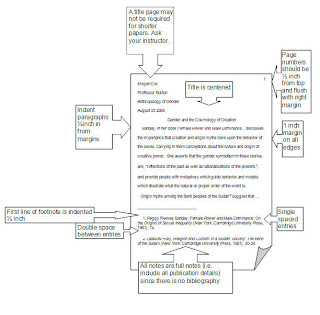
Recommendations here are based on the MLA Handbook for Writers of Research Papers. It is important to note, however, that individual instructors and institutions or departments may vary from these recommendations somewhat and that it is always wise to consult with your instructor before formatting and submitting your work.


Paper:

Use white, twenty-pound, 81/2- by 11-inch paper. Erasable paper tends to smudge and should be avoided for a final draft. If you prefer to use erasable paper in the preparation of your paper, submit a good photocopy to your instructor.

Margins:

Except for page numbers (see below), leave one-inch margins all around the text of your paper -- left side, right side, and top and bottom. Paragraphs should be indented half an inch; set-off quotations should be indented an inch from the left margin (five spaces and ten spaces, respectively, on standard typewriters).

Spacing:

The MLA Guide says that "the research paper must be double-spaced," including quotations, notes, and the list of works cited.

Heading and Title:

Your research paper does not need a title page. At the top of the first page, at the left-hand margin, type your name, your instructor's name, the course name and number, and the date -- all on separate, double-spaced lines. Then double-space again and center the title above your text. (If your title requires more than one line, double-space between the lines.) Double-space again before beginning your text. The title should be neither underlined nor written in all capital letters. Capitalize only the first, last, and principal words of the title. Titles might end with a question mark or an exclamation mark if that is appropriate, but not in a period. Titles written in other languages are capitalized and punctuated according to different rules, and writers should consult the MLA Guide or their instructors.

Page Numbers:

Number your pages consecutively throughout the manuscript (including the first page) in the upper right-hand corner of each page, one-half inch from the top. Type your last name before the page number. Most word processing programs provide for a "running head," which you can set up as you create the format for the paper, at the same time you are establishing things like the one-inch margins and the double-spacing. This feature makes the appearance and consistency of the page numbering a great convenience. Make sure the page-number is always an inch from the right-hand edge of the paper (flush with the right-hand margin of your text) and that there is a double-space between the page number and the top line of text. Do not use the abbreviation p. or any other mark before the page number.


Tables and Figures:

Tables should be labeled "Table," given an arabic numeral, and captioned (with those words flush to the left-hand margin). Other material such as photographs, images, charts, and line-drawings should be labeled "Figure" and be properly numbered and captioned.

Binders:

Generally, the simpler the better. Why spend money on gimmicky, unwieldy, slippery binders, when instructors prefer nice, flat stacks of papers they can stuff into their briefcases and backpacks? A simple staple in the upper left-hand corner of your paper should suffice, although the MLA Guide suggests that a paper clip can be removed and this facilitates reading (which suggests to us that it's been a long time since the people at MLA have had to deal with stacks of student papers). Your instructors or their departments may have their own rules about binders, and you should consult with them about this matter.